Last updated November 2025. Updated for the latest Microsoft Teams Phone features.
If you’re running Cisco Unified Communications Manager (UCM) alongside Microsoft Teams, you’re already using two of the most powerful collaboration platforms on the market. In 2025, integration between the two has never been easier. Microsoft Teams Phone now supports Shared Calling, Copilot-powered call summaries, and multi-tenant Direct Routing — all features that make hybrid Cisco-Teams environments smoother than ever.
The only thing better than running these powerhouses standalone? Integrating them!
Can Microsoft Teams integrate with Cisco Call Manager?
Yes, Microsoft Teams can now integrate with Cisco Call Manager.
Today, Microsoft Teams Phone fully supports Cisco UCM on-premises or cloud (UCM Cloud) through Direct Routing or via automation platforms like Callroute. These options let enterprises retain Cisco infrastructure while modernising collaboration in Teams.
There are two options you can follow to achieve this:
- Direct Routing for Microsoft Teams Phone with Cisco Unified Communications Manager (UCM) via Cisco Unified Border Element (CUBE)
- Use Callroute as your voice aggregator to integrate Cisco UCM with Microsoft Teams
The benefit of using the CUBE option is that you retain all your Cisco infrastructure and have a familiar setup. Nothing changes once you’ve gone through the integration process.
If you’ve got one location with a single CUCM instance but users who are using Teams for meetings and collaboration, this option is just fine.
But, if you’ve got multiple locations, each with different phone systems or calling providers, this is where Callroute comes into its own.

1 – Direct Routing for Microsoft Teams Phone with Cisco Unified Communications Manager (UCM) via Cisco Unified Border Element (CUBE)
If you’re familiar with Cisco terminology and interfaces, the CUBE (Cisco Unified Border Element) option is a viable scenario. If not, it can be tricky to navigate without the relevant training and experience.
Direct Routing has matured since its launch — now supporting shared SBC registration, end-to-end TLS/SRTP encryption, and hybrid multi-tenant setups where both Cisco and Teams users coexist seamlessly.
What we’re doing here is enabling calling between your Microsoft Teams Phone and Cisco UCM or via the PSTN (using CUBE).
The first thing you need to do is familiarize yourself with the components in play.
On the Microsoft side, your Teams tenant must have Microsoft Enterprise and Phone System licenses.
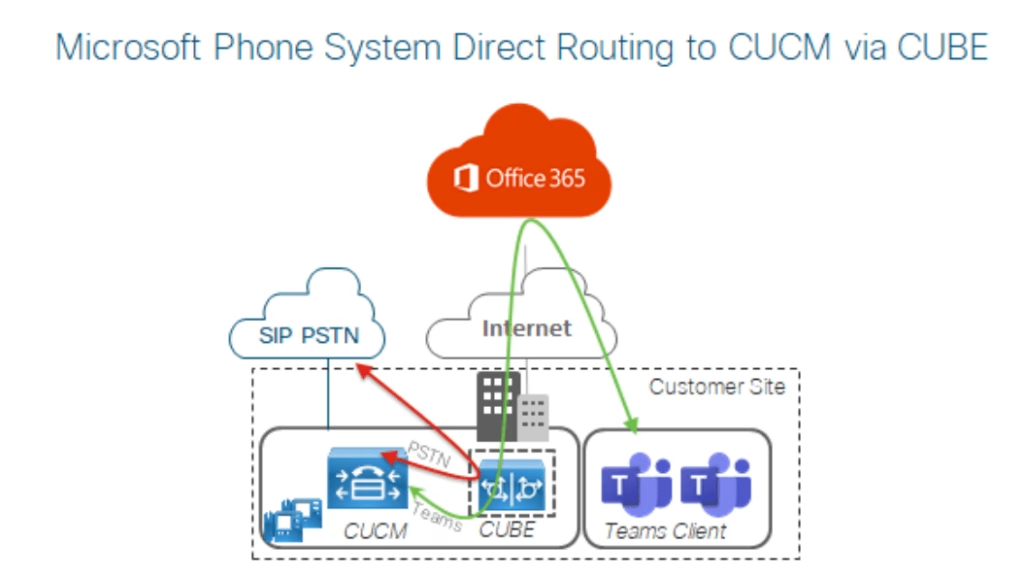
Network Topology Diagram
Here is the network topology diagram for Direct Routing deployment with on-premises Cisco UCM. Here you can see elements including:
- CUBE
- Cisco UCM
- IP phones
- PSTN
There aren’t any limitations on which versions that can be used.
You also need access to the Microsoft 365 Admin Center to configure a gateway trunk associated with the CUBE.
The trunk between CUBE and Microsoft will use TLS/SRTP and the trunk between CUBE and UCM will use UDP/RTP.
Next, you need to know about the two possible ways to enable call routing.
If you’re deploying what Cisco calls Coresident Direct Routing (when you use a common CUBE to connect Microsoft Teams Phone to CUCM and the PSTN), there are two call routing options:
- Call routing with CUCM
- Call routing with CUBE
Using CUCM, all calls regardless of destination get routed via CUCM. All dial plan management gets centralized and is Cisco’s recommended solution for integrating Microsoft Teams with CUCM.
When a PSTN gateway is in use, calls from Microsoft route through CUBE then back to CUBE to the PSTN trunk.
Using CUBE, all calls between Microsoft and the PSTN get routed via CUBE. It’s a common scenario when one of your goals is to reduce the number of legs during a call. This isn’t Cisco’s recommend solution for integrating CUCM and Teams as it often requires management of a complex CUBE dial plan.
If you’re deploying what Cisco calls Dedicated Direct Routing (where you have one CUBE for Direct Routing and another gateway for connecting to the PSTN), you only have the first option: Call routing with CUCM.
Features available when you connect CUCM and Microsoft Teams using CUBE
- Basic two-way calling
- Caller ID both ways
- Caller ID restriction
- Call transfer
- Call forwarding
- Hold and resume
- Music on hold
- Three-way conferencing
- Call park
- Extend and connect
- Single number reach (connects desk phone and Teams client)
- Voicemail
New additions:
- Shared Calling group support (Teams Phone)
- AI call transcription and recap via Copilot for Teams Phone
Limitations when you connect CUCM and Microsoft Teams using CUBE
As with any integration between two major vendors, there are going to be some limitations.
Here is everything Cisco flags in its documentation:
- You must use a media termination point to ensure hold and transfer works correctly
- No overlap dialing
- No alerting name updates
- No privacy ID
- Caller ID doesn’t update during conferencing scenarios
- No messaging waiting indication
- Video codecs not supported
- No automatic callback
- Calls parked by Microsoft Teams can only be retrieved by Microsoft Teams
- You must configure +E164 to direct extended calls to Microsoft when using Remote Destination
- Lines can’t be shared between Cisco UCM and Microsoft Teams clients
- Video and message-waiting indicators remain unsupported cross-platform
- AI recaps apply only to calls answered in Teams Phone
2 – Use Callroute as your voice aggregator to integrate Cisco UCM with Microsoft Teams
Self Service Platform
When you use Callroute, you’re opting for a self-service portal that brings all your telephony management into a single pane of glass.
You still need CUBE to connect SIP trunks between Callroute and CUCM. But the value of using Callroute vs a “DIY” CUBE to Teams is in the Direct Routing element.
With increased management options and long-term benefits, you get access number management, policy management, and PSTN connections in a single portal.
In hybrid deployments, Callroute also supports Shared Calling, multi-tenant Direct Routing, and automated provisioning using Entra ID attributes. This ensures user policies, extensions, and numbers stay consistent across both Cisco UCM and Teams.
When you do this, you enable:
- Automated failover
- Per number routing
- Auto-provisioning
- One-click deployment
If your goal is never to move away from Cisco and you have a team to support your Teams telephony, then you don’t need Callroute for just voice. You may find a benefit of using Callroute for auto-provisioning though.
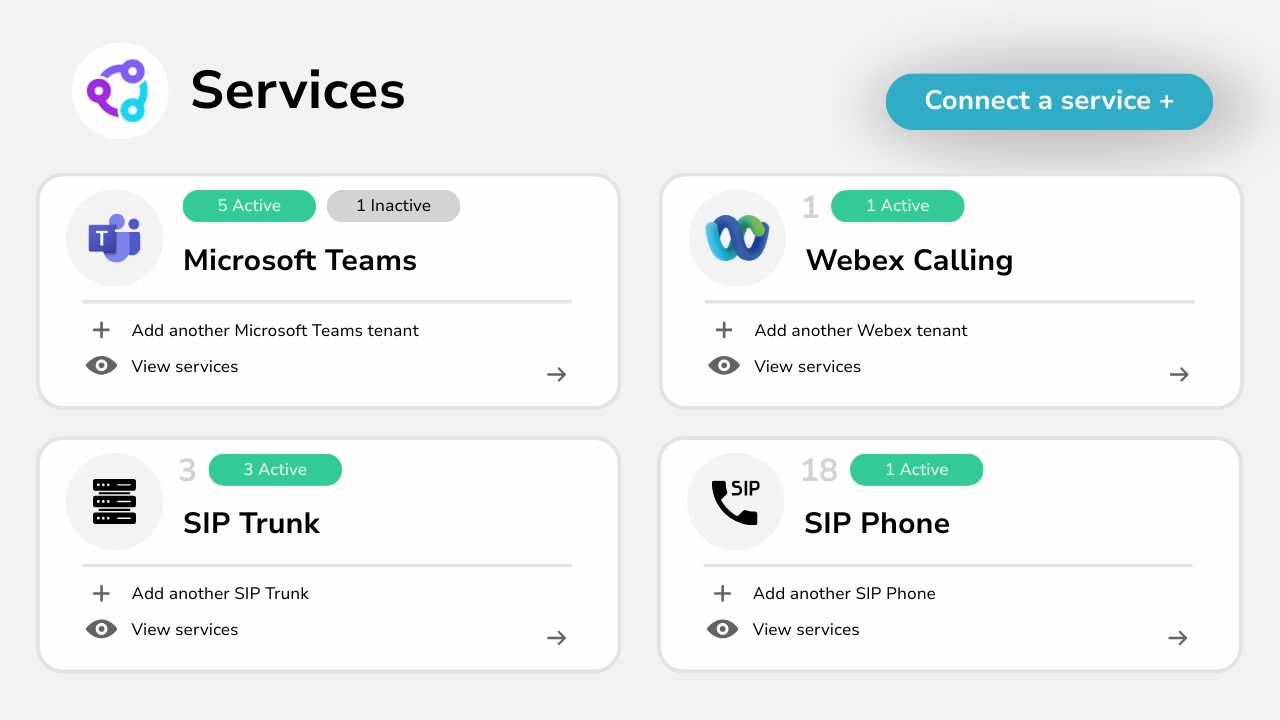
Consolidate Your PSTN Lines To The Cloud
But, if your goal is to eventually remove CUCM, then using Callroute now gives you the chance to move and consolidate your PSTN lines to the cloud and distribute calling efficiently across both Cisco and Teams.
Then, when you are ready, you can simply offboard Cisco without impacting business as usual or your Teams deployment.
You then get the benefit of management, auto-provisioning, and consolidation along with a platform that can adapt to your next change in circumstances and with no reliance on hardware.

Here’s how to connect CUCM to Microsoft Teams using Callroute
Before you get started, you need the following pre-requisites:
- Microsoft Teams Enterprise and Microsoft Teams Phone license
- Full Cisco UCM access
- Public IP on CUBE
- Callroute license
- Firewall opened to Callroute IP addresses
When you have all these ready, follow these instructions to integrate CUCM and Microsoft Teams.
Step 1: Connect A Service
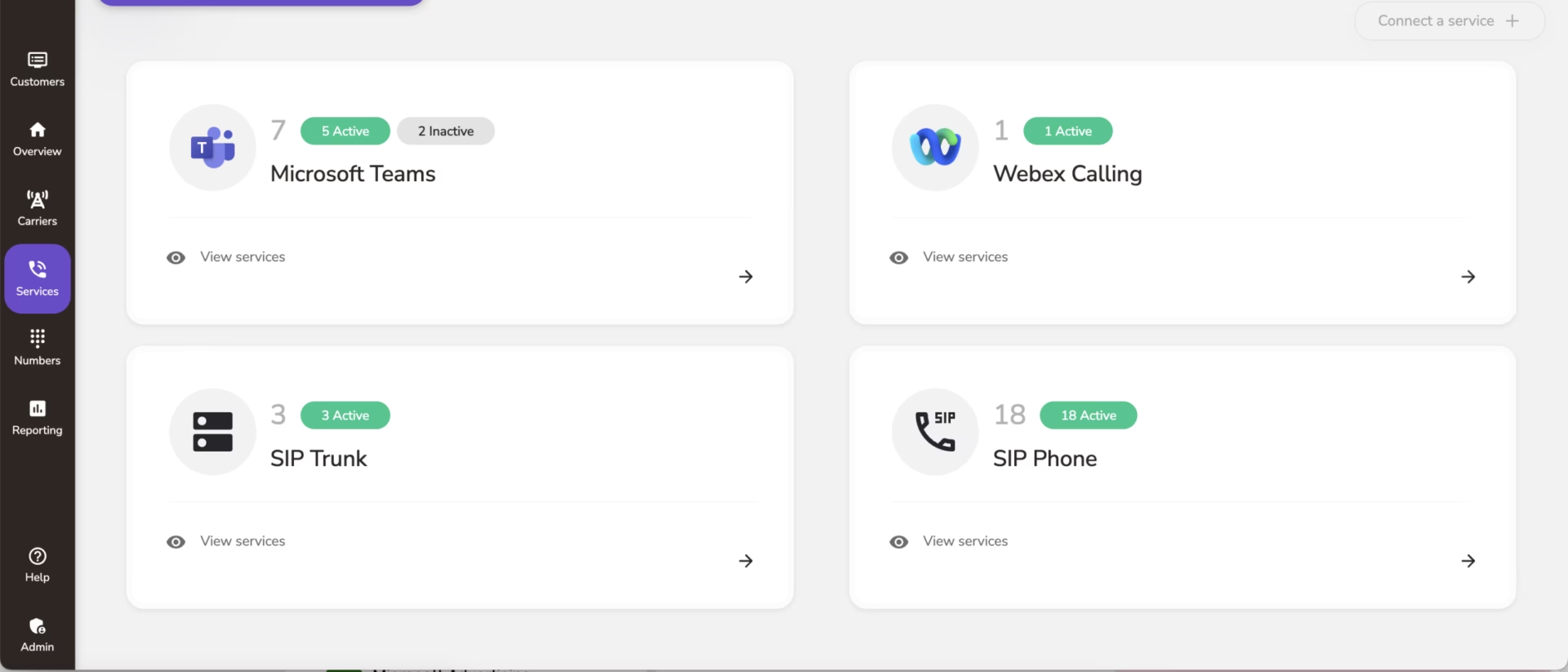
Log in to the Callroute App, click the Services icon in the left-hand side menu, then click Connect a service from the top right of the page.
Step 2: Connect Cisco All Manager
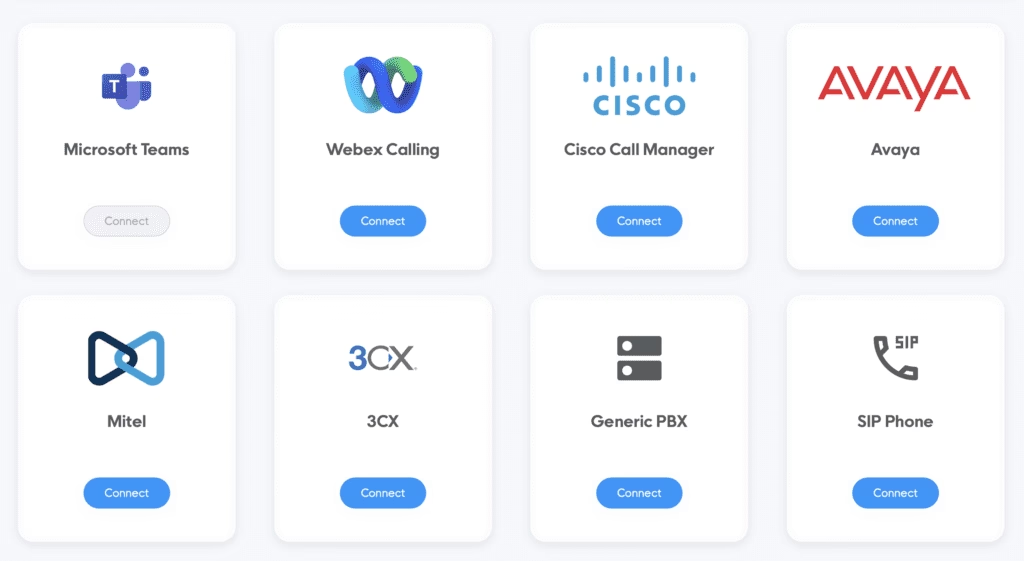
You will be provided a variety of options to to pick from. Choose Cisco Call Manager from the available options.
Step 3: Fill In The Information
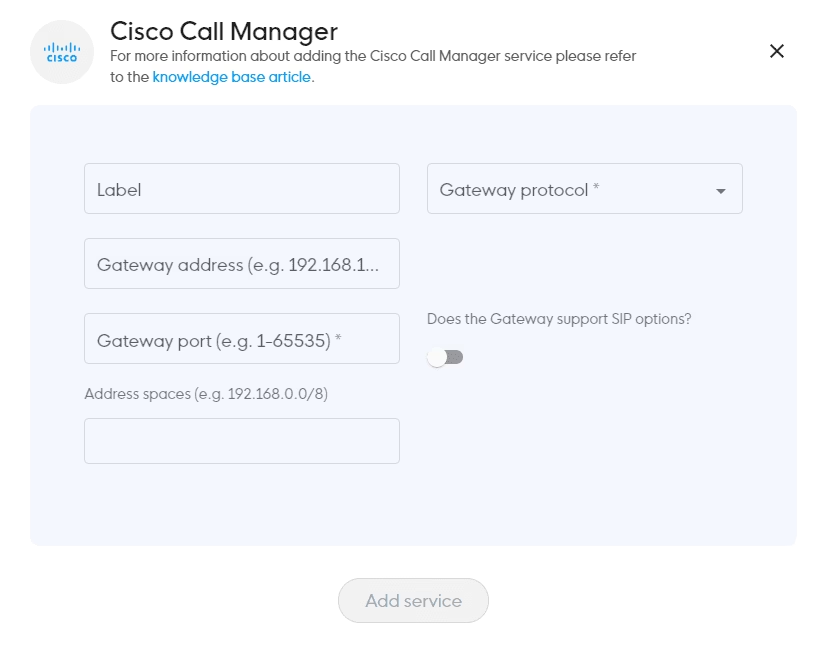
You will now need to complete the following form to generate the trunk credentials:
- Label = Logical Name to identify the trunk e.g., London, Manchester.
- Gateway Protocol = UDP or TLS – this will depend on the capability of your system.
- Gateway address = this can be a FQDN or a public IP address and is the address of your SIP capable system.
- Gateway Port = 5060 UDP or 5061 TLS (this is automatically populated depending on the protocol you set above).
- Address Space = this is a list of allowed public IP addresses which calls can originate from in CIDR format. multiple entries can be added if required.
- SIP options can also be enabled if your system supports it for service monitoring.
- Once you populate the fields you can select Add Service which will commence the service creation.
- This can take a few minutes to complete so please be patient.
Step 4: Refresh The Page
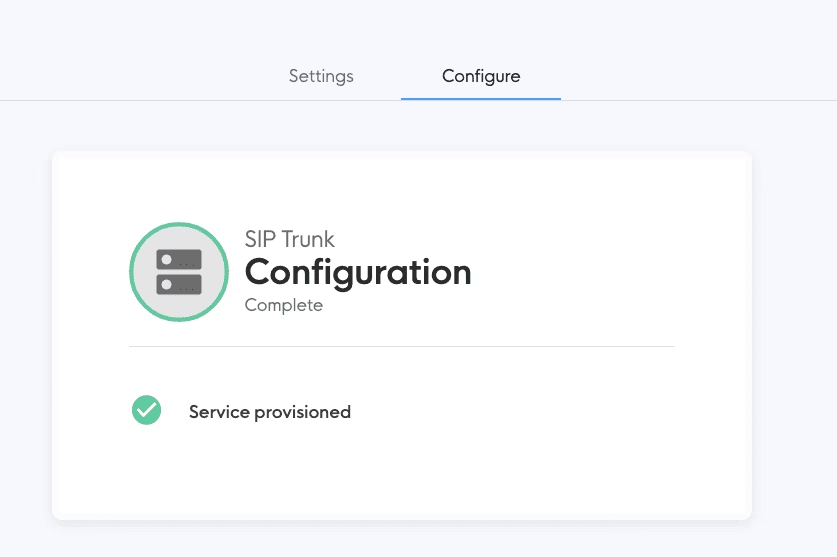
When the service has been created, refresh your page and you will see a Service provisioned message.
Step 5: Open The Settings
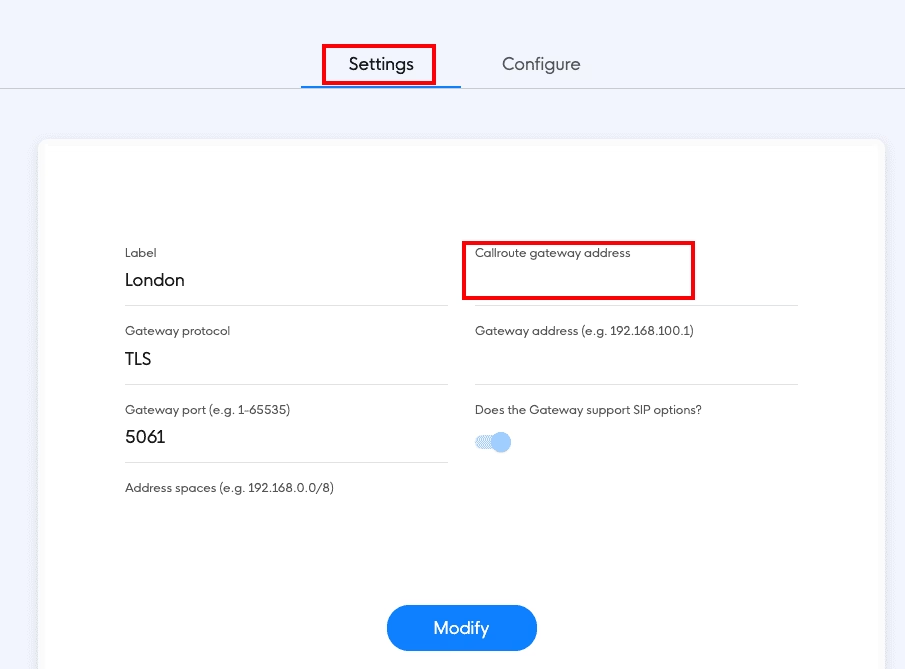
Next, click on the Settings tab to display all the configuration parameters for the newly created service.
Pay special attention to the “Callroute gateway address” as this is the destination you need to configure your CUCM to send calls to and is unique for each SIP trunk. You are also able to select Modify if you need to amend or update trunk information.
Note: some information has been removed from the example screenshot for security purposes
Step 6: Return to the Services Page
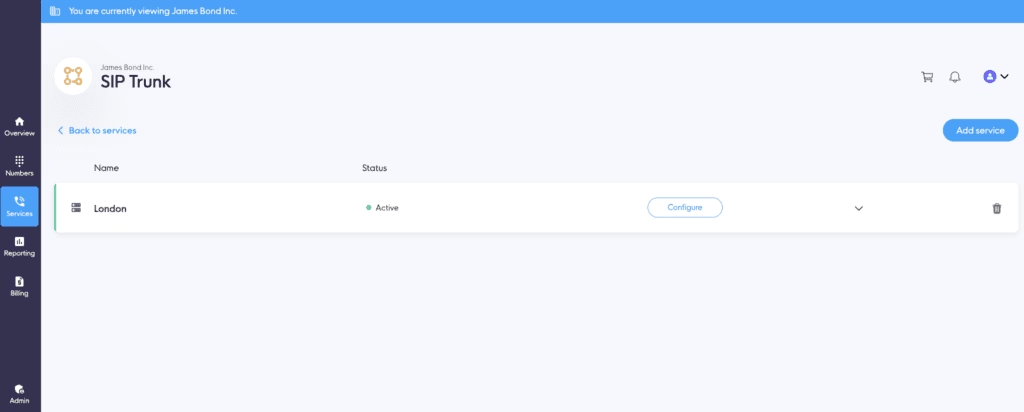
Once you return to the Services page, you will now see the SIP trunk you just configured.
Step 7: View Additional Information And Perform Tasks
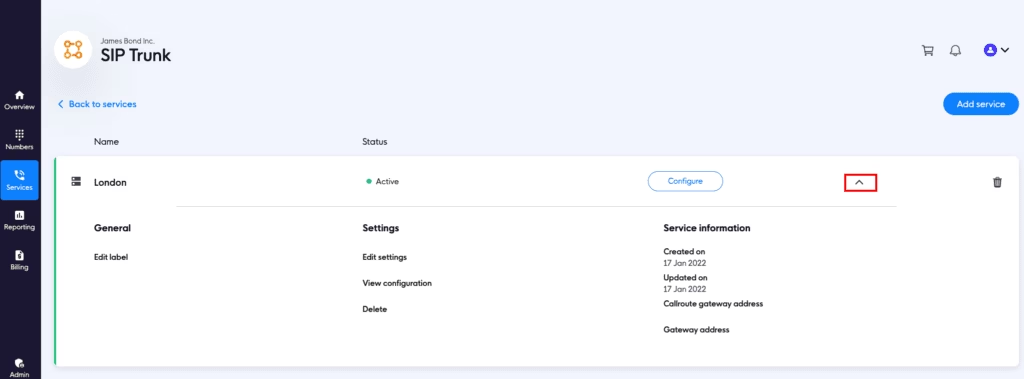
You can now click on the drop-down icon on the right-hand side to display additional information and perform additional tasks.
You can now configure your SIP-capable system using the provided settings to test outbound calling.
To test inbound calling, you just need to load your Cisco numbers into Callroute that you plan to use with Teams. Once set up, you can begin any inbound testing.
Once integration is complete, you can manage dial plans, SBC routes, and user provisioning directly in Callroute. Entra ID synchronisation keeps both Cisco and Teams aligned automatically.
Conclusion
If you’re a single location with Cisco UCM and Microsoft Teams, using the CUBE option is fine for now.
If you’ve got multiple offices and several different telephony providers, and want to make Teams your primary collaboration interface, Callroute simplifies the entire process.
We put number management, policy management, and PSTN connections into a single portal. Consolidate your PSTN connections and connect your phone systems to make on-net calls. Move users between your phone systems and keep their original number.
In 2025 and beyond, Callroute’s automation, Shared Calling compatibility, and auto provisioning make it the most efficient bridge between Cisco UCM and Microsoft Teams Phone — all without complex PowerShell or hardware lock-in.
Book a demo at a time that suits you to see how it works and discuss how Callroute can help.