Add Users To Call Queues As Agents Automatically

Users may need to be agents in multiple call queues. Managing their agent membership can be complicated and confusing. With Orto for Teams, we make this simple and quick.

Diagram showing call queue management with assignment and profile information.

Add Agents To Call Queues

Add users that should be agents to all the required call queues at once based on their job role or department
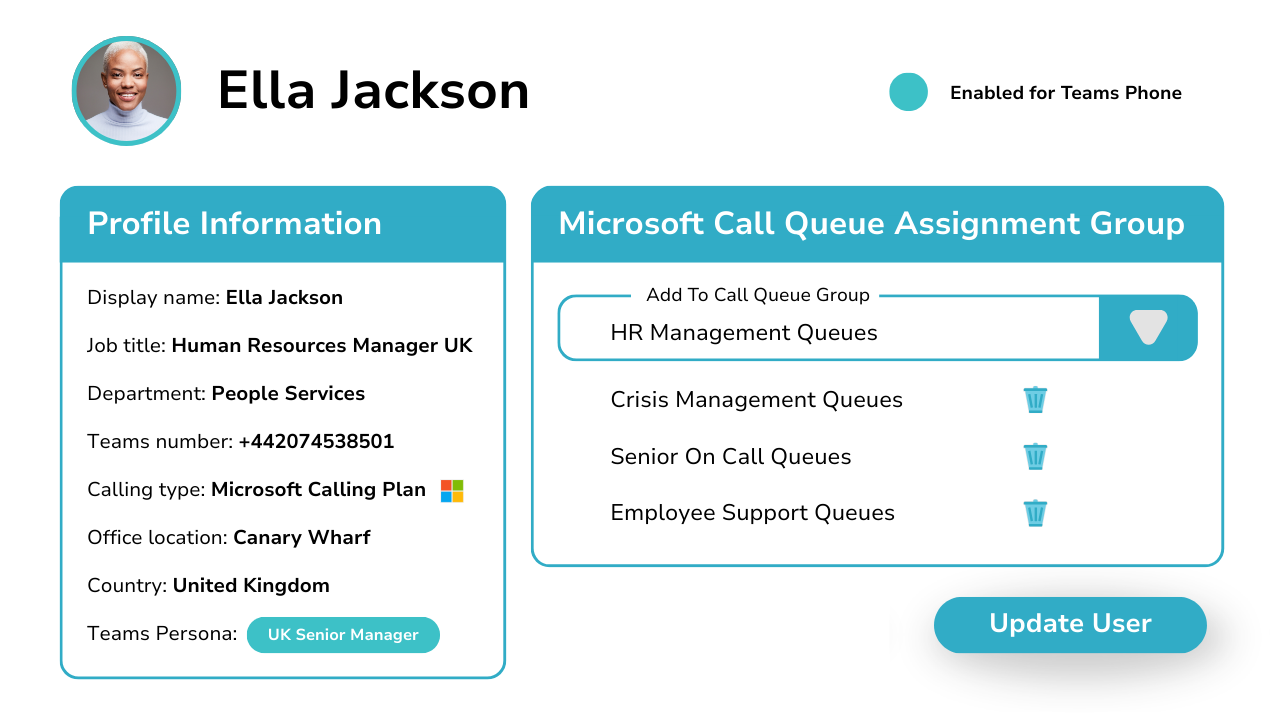
Diagram showing call queue management with assignment and profile information.

Assign Agents To Multiple Queues In Seconds

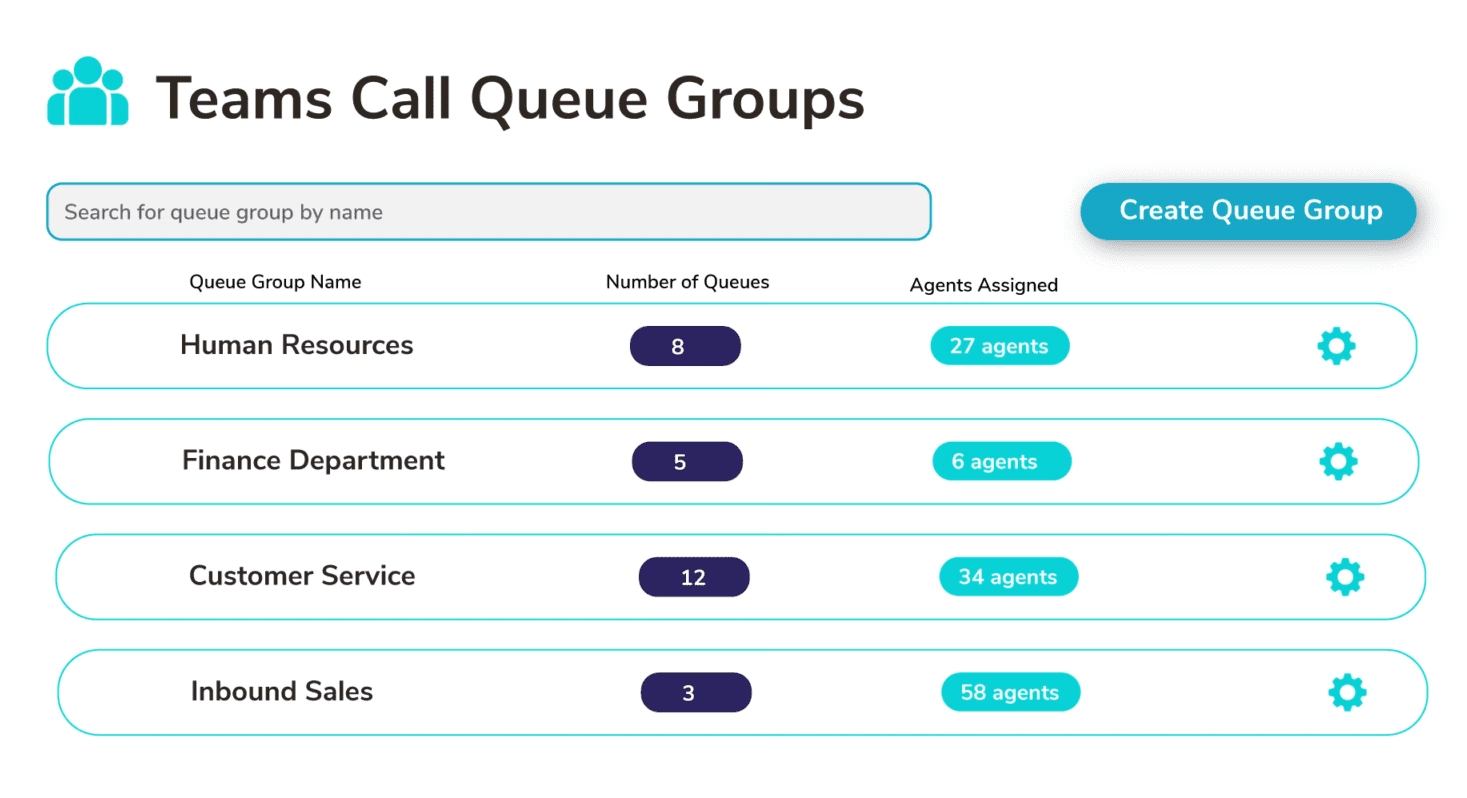
Creating queue groups allows you to package together all the call queues users need to be an agent of based on their job role.

You can then add them as an agent of these queues in 1-click

Direct, Distribution List, or Voice Enabled Channels

Orto for Teams supports all queue answering types. It does not matter if your queues are configured for direct agent, distribution list, or Teams voice enabled channels, Orto will add your users as agents.
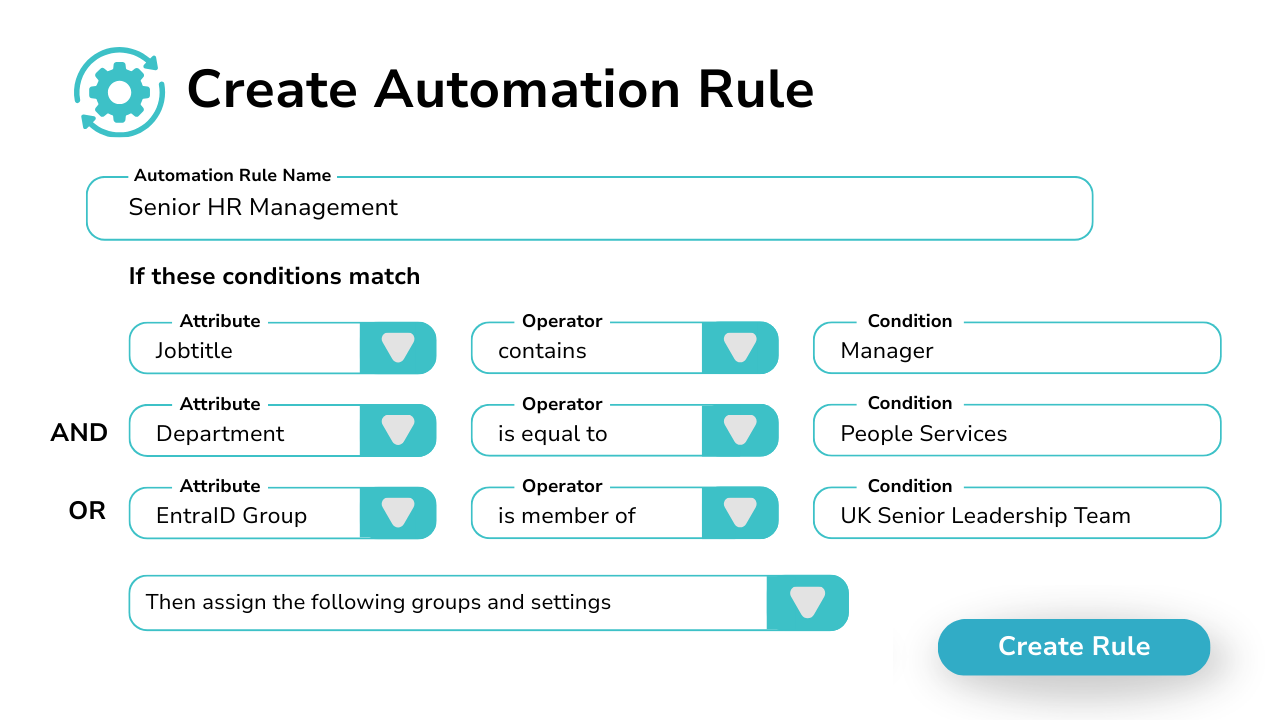
Automate Teams Call Queue Assignment

Create provisioning rules that automatically assign users to call queues based on their Entra ID attributes or Microsoft 365 group membership.

Once the user is enabled in Entra ID, Orto for Teams will detect the user and assign them to call queues matching their account profile. Leaving you to concentrate on more complicated IT issues.

Pricing Plans

Lorem ipsum dolor sit amet, consectetur adipiscing elit, sed do eiusmod tempor incididunt ut labore et dolore magna aliqua. Ut enim ad minim veniam, quis nostrud exercitation ullamco laboris nisi ut aliquip ex ea commodo consequat.

Currency:

GBP
  • GBP
  • EUR
  • USA

Orto Standard

Simplify Microsoft Teams user management — numbers, policies, licenses, and call queues.

Orto Pro

For enterprises that want to fully automate Microsoft Teams user provisioning

No. Users:

£0.50 monthly per user

N/A for selected user count

Minimum users

50+

200+

Number inventory management

Policy & persona management

Granular Roles-Based Access Control

Delegate user management by region

Microsoft license administration

Call queue administration

Automated provisioning

Provisioning API

What Our Customers Say

  • “Callroute making calling easy.

    We have really enjoyed using Callroute and are moving a lot of our clients to it and would recommend it to others.
    The ease to use while integrating with teams it makes managing the whole process easy along with reports making it easy to view incoming and outgoing calls.”

    Jack

    Junior support technician in UK

    Information Technology & Services, 2–10 Employees

  • “Overall very good. Its a simple product, easy to use. Company good to deal with, quick to respond to issues and knowledgeable support team.

    Quick to assign numbers to users. Very easy to find either free unused number or those that are allocated and who to. Tagging system is useful for reporting.”

    Toby

    Head of Service Management in UK

    Publishing, 1,001–5,000 Employees

  • “Overall, my experience with Callroute was solid. The platform offered strong integration capabilities and simplified several aspects of voice routing and number management. While there were areas that could be more intuitive, the core functionality was dependable and added value operationally.
    What I liked most about Callroute was how seamlessly it integrates with existing communication platforms. It removes a lot of the complexity around voice routing and number management, which makes day‑to‑day operations much smoother.”

    Verified Reviewer

    Verified User

    Insurance, 11–50 Employees

Teams Call Queue Automation FAQs

Yes, you can try Callroute free with a 14-day trial. No credit card and no commitment required. Your trial includes:

  • 1x UK 0330 number
  • 1x single concurrent call limit
  • Connect up to 4 Microsoft Teams tenants
  • Explore all Callroute Teams Calling features
  • Explore all Orto Teams User Management features

To get started, book a guided setup session so we can tailor the trial to your requirements. All you need is an email address, which you’ll verify during setup.

Orto is able to add / remove agents to all types of Teams call queue configurations including:

  • Direct Agent
  • Distribution List
  • Teams Voice Enabled Channels
You can add users as agents of call queues within a call queue group manually using our management portal.
You can change the queues within a group at any time. When you add or remove a queue from a group, an user already assigned that group will be updated to reflect the current configured state.
Orto only works with Teams Call Queues. We do have integrations with some 3rd Party Teams contact centers on our roadmap.
Orto is a provisioning solution that enables to process user MACDs automatically. At present, Orto does not let you configure how a call queue functions, this must be controlled using Teams Admin Center. However, you can change the voice application policy assigned to the queue using Orto user persona management.

Book a demo

Join over 150,000 other users that use Callroute to stay connected, and manage their numbers and user more efficiently.
