If you’re looking to turn Microsoft Teams into your business phone system, you’re going to need PSTN connectivity.
You’ve got three main options:
There is also a fourth option to consider: Teams Phone Mobile. This is a niche selection for when you wish your landline to be your mobile number.
In this post, we’re focusing on the three core options available to businesses wishing to introduce Teams Phone for external calling.
First, we’re going to define what each option is. Then we’re going to introduce the pros and cons of each solution. Finally, we’re going to compare Teams Calling vs Operator Connect vs Direct Routing side by side.
What is Teams Calling?
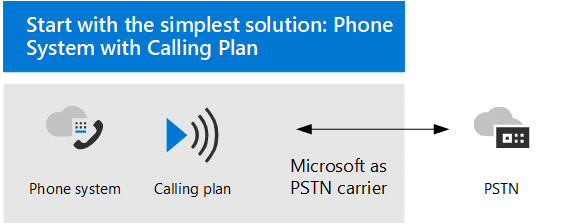
Calling Plan is the default Microsoft solution for making external PSTN calls from Microsoft Teams. Here, Microsoft is your only supplier for phone connectivity and calling minutes.
Calling Plan is charged on a per-user basis, starting between £4.50 per user/per month up to over £18.10 per user/per month—depending on your licenses, the number of minutes you need, and international calling capabilities.
It’s administered in the Teams Admin Center (TAC) and thought of as the simplest solutions for enabling external calling in Teams Phone.
Pros and cons of Teams Calling
| Microsoft Calling Plan Pros | Microsoft Calling Plan Cons |
| Activate quickly | Limited changes |
| Access in Teams Admin Center | Restricted integration |
| Good for basic calling requirements | Restricted telephony features |
| Regular monthly billing | Expensive when scaling |
| Per user billing | Limited regions |
What is Operator Connect?
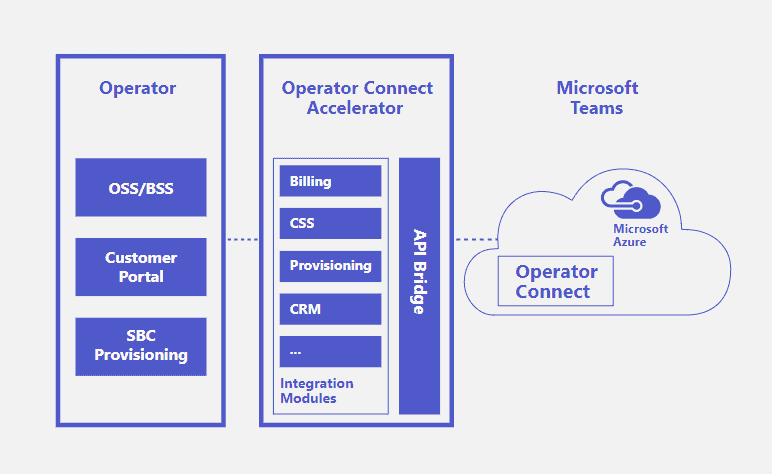
Operator Connect is when Microsoft verifies a telecommunications operator to provide cloud telephony services via a direct connection on Microsoft’s infrastructure.
For example, in the UK, you might have an existing calling agreement with BT. In the US, it might be Verizon or AT&T. These are all approved Operator Connect partners who can provide cloud telephony via Microsoft Teams.
When set up, users make calls using their Teams client, but the “Operator” makes the call behind the scenes. Just like Direct Routing, there’s no difference seen by users making calls.
Pros and cons of Operator Connect
| Microsoft Operator Connect Pros | Microsoft Operator Connect Cons |
| Wide geographical reach | Management of extra provider for support, contracts, etc. |
| No number porting needed | Your provider may not be approved |
| Advanced routing | Management of extra providers for support, contracts, etc. |
| More options for integration | Less flexibility than Direct Routing |
| May be tied into a longer contract | Overwhelming choice of operators if you’re selecting new |
What is Direct Routing?
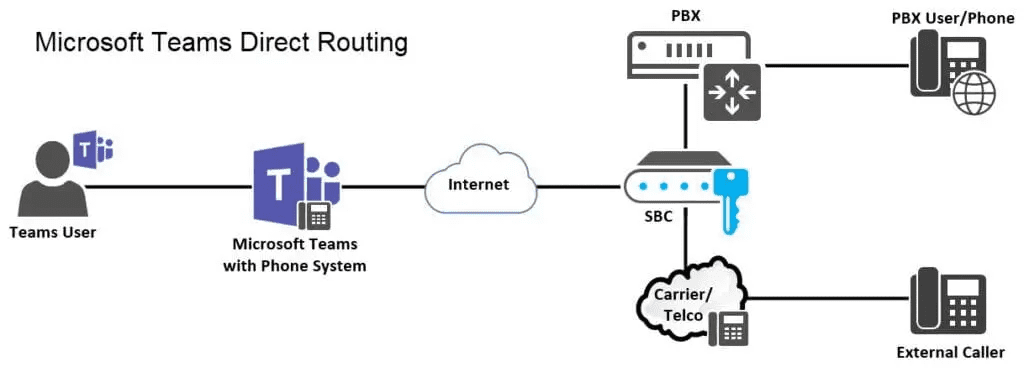
Microsoft Teams Direct Routing, often referred to as just “Direct Routing” is when Microsoft supports connecting session border controllers (SBCs) to Teams. This could either be in your own SBC or a vendor’s environment.
The physical or virtual SBC connects telephony (on-premises or virtual) on one side to the cloud (Teams). There’s no certification for vendors or end customers to become ready-to-use for Teams. Only the physical equipment can be Teams-certified.
When you opt for Direct Routing, you get Teams access to unique functionality that an SBC enables. This includes advanced routing rules that you can’t (yet, at least) replicate on a Microsoft Calling Plan deployment.
So, if you need any/all of the following PBX features, Direct Routing is likely the best choice:
- PBX interop
- Least cost routing
- Media bypass
- SIP trunks
- Analog devices
- Fax
- ISDN connectivity
- Local site breakout
- Survival branch appliance
- Complex routing
- Extension support
- Disaster recovery
Pros and cons of Direct Routing
| Pros | Cons |
| Provides a consistent user experience as there’s no third-party calling app | Administered via third-party apps or support requests |
| Covers regions outside of Microsoft Calling Plan | Requires complex and timely setup |
| Allows users to make calls directly from Teams | Moves, adds, and changes can’t be automated and take considerable time |
| Enables integration with line of business apps | Involves multiple vendors for billing, support, and communication |
| Lets you keep your existing phone numbers | Porting of numbers comes with risk and delays |
| Scales easily by adding and deleting users | Limited support from Microsoft; over-reliance on single vendors |
| See out your existing telephony contract | May miss out on technology advancements while you see out your existing telephony contract |
| Enables complex routing setups | Non-Microsoft SLA |
Teams Calling vs Operator Connect vs Direct Routing
| Microsoft Teams Direct Routing | Microsoft Operator Connect | Teams Calling Plan |
| Bring your own carrier | Choose from approved carriers | Microsoft is your carrier |
| On-premises or cloud managed SBC | Cloud only | Cloud only |
| Session border controllers must be approved | Operators must be verified by Microsoft | All-in on Microsoft |
| Managed, indirect connection between carrier and Microsoft | Direct connection between carrier network and Microsoft | Microsoft manages the connection |
| Numbers managed on third-party software | Numbers managed in Teams Admin Center | Numbers managed in Teams Admin Center |
| Different interface per SBC | Same interface if you have multiple carriers | Microsoft interface only |
| Available wherever your SBC is | Not available in all countries | Not available in all countries |
| Third-party SBC SLA | Microsoft SLA | Microsoft SLA |
| Support for legacy PBX functionality via SBC | Legacy PBX functionality not supported | Legacy PBX functionality not supported |
| Supports all PBX integrations | Supports Microsoft 365 approved integrations | Supports Microsoft 365 approved integrations |
| Supports hybrid deployments | No support for hybrid deployments | No support for hybrid deployments |
| Configurable voice routing | Standard voice routing only | Standard voice routing only |
When to choose Teams Calling vs Operator Connect vs Direct Routing
Choose Teams Calling when…
- You have basic requirements for Teams Phone
- You don’t have a multi-regional setup
- You don’t need complex call queues or routing
Choose Direct Routing when…
- Long-term phone system contracts are already in place
- You need specific functionality not supported by Teams Phone
- There are industry-specific regulations restricting your options
Choose Operator Connect when…
- You’re ready to go all-in on the cloud
- You value speed and complexity over complex routing
- You don’t have in-house resources to manage your phone system
Learn more about your choice for PSTN connectivity
If you’ve highlighted one choice to be more favorable than the other, it’s time to learn more about your selection.
Here is our suggested reading for each option: