
Manage Team Policies
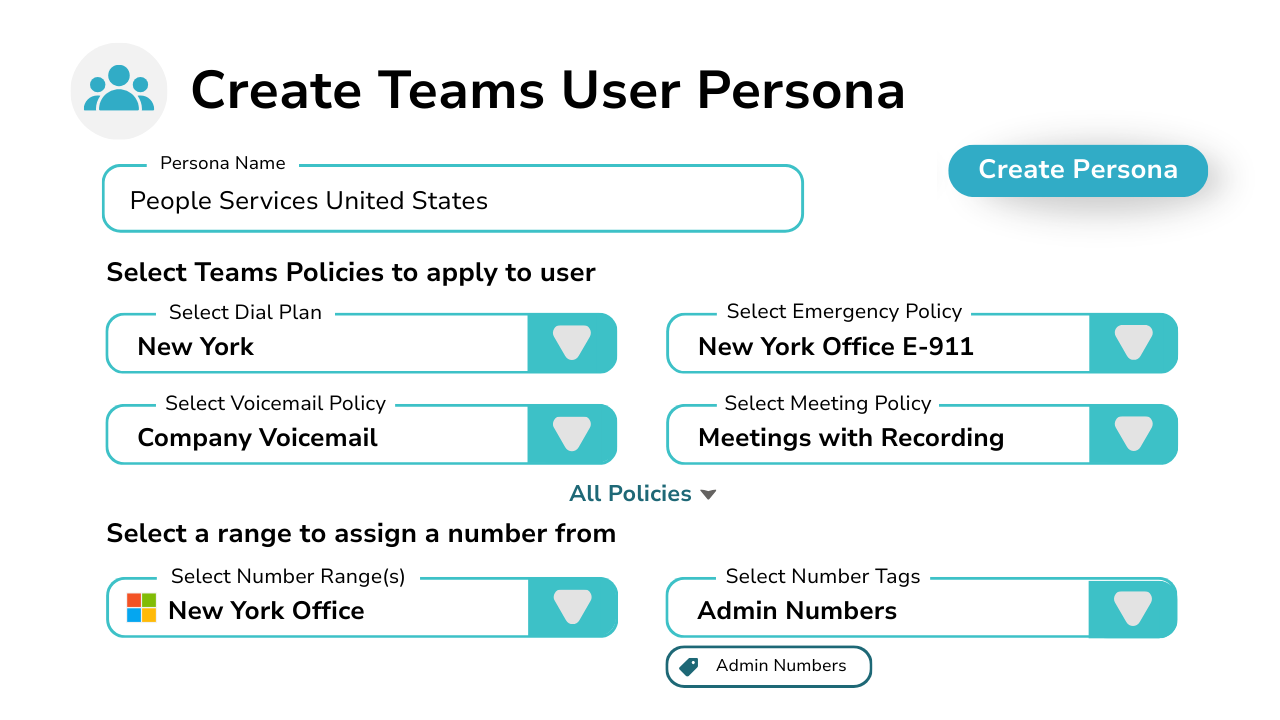
Microsoft Teams user policy management just got faster using Orto personas – the smarter way to streamline user set up and management.
Better tools to manage your teams numbers
Keep your number ranges up to date
Get Microsoft Teams Calling with our Direct Routing solution for Microsoft Teams Phone.
Assign Numbers To Users
Get Microsoft Teams Calling with our Direct Routing solution for Microsoft Teams Phone.
Categorize Your Numbers Using Tags
Connect Webex to the PSTN – bring your own carrier or use our fully managed voice services.
Organize Your Numbers Into Your Custom Locations
Get Microsoft Teams Calling with our Direct Routing solution for Microsoft Teams Phone.
Reserve Numbers To Prevent Accidental Assignment
Get Microsoft Teams Calling with our Direct Routing solution for Microsoft Teams Phone.
Quarantine Recently Unassigned Numbers
Connect Webex to the PSTN – bring your own carrier or use our fully managed voice services.
Key features of Our User Management Platform

Create Your Teams User Policy Standards
Standardize user policy combinations by role or department for consistent user experiences and reduced service desk tickets.
- 1-click assignment to users
Create full Teams lifecycle policy personas
- Create voice-only user personas
Automatically assign the next available number
Easily Manage Your Personas
Keep on top of change and apply persona updates to all your users instantly.
- Change a persona in just a few clicks
- Apply a different persona when a user moves role
- Copy personas as a template
- Create personas matching all Teams users


Enable Change Effortlessly Within Your Business
As business and user needs change so do your Teams policies and personas to support them.
- Duplicate existing personas in 1-click
- Change policies within a persona
- Migrate users from their old persona to new
- Remove deprecated personas to avoid errors
Assign Phone Numbers With Personas
Manage your Teams Phone numbers and assign them as part of your persona without any additional effort.
- Manage Microsoft, Operator Connect, & Direct Routing
- Categorize numbers by tag & location
- Assign ranges to personas for auto assignment
- Dynamic persona for both voice and non-voice users


Upgrade User Licenses To Teams Phone
Assign users a Teams Phone license along with their persona and number when you receive a service upgrade request.
Create license packages defined for Teams Phone
- Create hierarchical packages for least admin effort
- No multi-portal access
- Assign to user with their persona and number at once
Automate Teams Policy Assignment
Deploy Teams policies, phone numbers, team, and queue memberships to your users automatically.
- Create provisioning rules matched to each user role
- Assign their entire Teams access requirements at once
- Target users by AD attributes or group memberships
- Automatically provisions users every hour

What Teams User Policies Can You Assign With Orto?
Unlike other competitor solutions, you can assign all Teams user policies to a persona and user using Orto.
Call Park
Call Hold
Caller ID
Calling Policy
Dial Plan
Voice Routing
Shared Calling
IP Phone
Voicemail
Voice Application
Emergency Calling
Emergency Call Routing
Meeting Policy
Audio Conferencing
Dial-In Conferencing
Dial-Out Conferencing
Meeting Branding
Meeting Broadcast
Meeting Video Interop
Events
Messaging
Channels
Files
External Access
App Permissions
Application Access
App Setup
VDI
Mobility
IP Phone
Shifts
Workload
Compliance Recording
Enhanced Encryption
Media Logging
Feedback
Update Management
Here’s What Happens When You Automate User Policies
SAVE
SAVE
IMPROVE
SAVE
Pricing Plans
Currency:
 GBP
GBP GBP
GBP- EUR
- USA
 EUR
EUR USA
USAOrto Standard
Simplify Microsoft Teams user management — numbers, policies, licences, and call queues.
Orto Pro
For enterprises that want to fully automate Microsoft Teams user provisioning
No. Users:
£0.50 monthly per user
N/A for selected user count
Minimum users
50+
200+
Number inventory management
Policy & persona management
Granular Roles-Based Access Control
Delegate user management by region
Microsoft license administration
Call queue administration
Automated provisioning
Provisioning API
Use Cases
Standardise Teams policy assignment
Apply consistent calling, meeting and voice policies across departments, roles or regions. Replace manual, user-by-user configuration with structured policy packs to ensure every user is provisioned correctly from day one.
Assign policies and numbers across one or multiple tenants
Manage Microsoft Teams policies, number allocation and full number lifecycle from a single platform. Maintain consistency and visibility across departments, regions or multiple tenants — without switching portals.
Enforce ITSM-driven approval before
policy assignment
Integrate with IT service management platforms to ensure requests for number or policy changes follow formal approval workflows. Automatically apply approved policies only after approval with enterprise governance standards.
What Our Customers Say
“Our partnership with Callroute has always been outstanding. Communication is seamless, and they consistently demonstrate exceptional customer focus. They are not just a partner; they are a true enabler of global telephony uptime. Their support is exceptionally responsive and a pleasure to work with, even on the rare occasions it’s needed.”
Dave
Health, Wellness & Fitness, 1,001–5,000 Employees
Telephony Engineer in UK
“Happy user. Has been great. This makes it much easier to manage numbers. Ease of use and quick support when I have had any issues.”
James
Technical Specialist - Collaboration in US
Packaging & Containers, 10,000+ Employees
“Finding CallRoute is possibly the best thing that’s happened for our telco platform. They’ve provided us with administrative and reporting capabilities that nobody else would. They’ve remained extremely flexible, allowing for outside the box thinking and customizations delivered faster than anyone would expect. We intend to stick with CallRoute for the long haul. Highly flexible, extremely attentive to requests and needs, support staff absolutely beyond compare.”
Russ
Telephony Architect in US
Mechanical or Industrial Engineering, 10,000+ Employees


Frequently Asked Questions
Yes, you can try Callroute free with a 14-day trial. No credit card and no commitment required. Your trial includes:
- 1x UK 0330 number
- 1x single concurrent call limit
- Connect up to 4 Microsoft Teams tenants
- Explore all Callroute Teams Calling features
- Explore all Orto Teams User Management features
To get started, book a guided setup session so we can tailor the trial to your requirements. All you need is an email address, which you’ll verify during setup.
Book a demo
Join over 150,000 other users that use Callroute to stay connected, and manage their numbers and user more efficiently.

