Automate Provisioning

Use our rule-based user provisioning to automatically configure your users’ Teams experience using their Entra ID attributes or group memberships.

  • No PowerShell scripts
  • Cut manual provisioning

  • Save valuable admin time

  • Eliminate provisioning errors

Diagram showing ways to create automation rules with an AND condition and OR condition.

Optimize Microsoft Teams User Management & Provisioning

If you’re managing Microsoft Teams at scale, you’re likely juggling PowerShell scripts, manual spreadsheets, and custom workflows to keep up with provisioning demands, but these workarounds weren’t built for speed, scale, or security. By automating Teams administration end to end, you can free IT admins from time-consuming, tedious tasks, focus on higher-value work, and unlock greater productivity across your entire organization.

Key features of Our User Management Platform

Enable your IT team to work smarter (not harder) by embracing the power of automation for Microsoft Teams Phone to enrich your support capabilities, not to replace them.

Diagram showing Creation of Microsoft Teams user personas.

Standardize User Provisioning

Define the Teams experience that users in different departments and locations should receive.

  • Eliminate human error

  • Speed up policy assignment

  • Set up new starters immediately

Organize & Manage Your Phone Numbers

Manage your phone numbers in one place and categorize them using tags and locations.

  • Categorize numbers for certain usages
  • Reserve and quarantine numbers for future use
  • Create ranges for each of your business locations
Diagram showing phone number management and organization with different countries.
Diagram showing creation of license groups with licenses.

Upgrade Microsoft 365 License Assignments

If a user needs to be activated for Teams Phone, they probably don’t have the license already assigned.

  • Create license packages to meet deployment needs
  • Apply licenses during new user provisioning or upgrades
  • Waits for licenses to be active and continues provisioning

Add Users To Call Queues As Agents

Tired of adding the same user to multiple call queues because their department has 9 IVR options?

  • Group queues together to match business function
  • Individual, Distribution Group, or Voice Enabled Channels
  • Automatically add users as agents to all queues in a group

Diagram showing the ceation of Teams call queue groups.
Diagram showing the creation of a group of teams.

Organize Teams By Department, Project, Or Role

Speed up user access from day one. Users need access to several collaboration teams to work effectively. Remove reliance on community sourced membership.

  • Group common teams by location, role, department
  • Add users as members or owners automatically
  • As users move roles, update their teams access

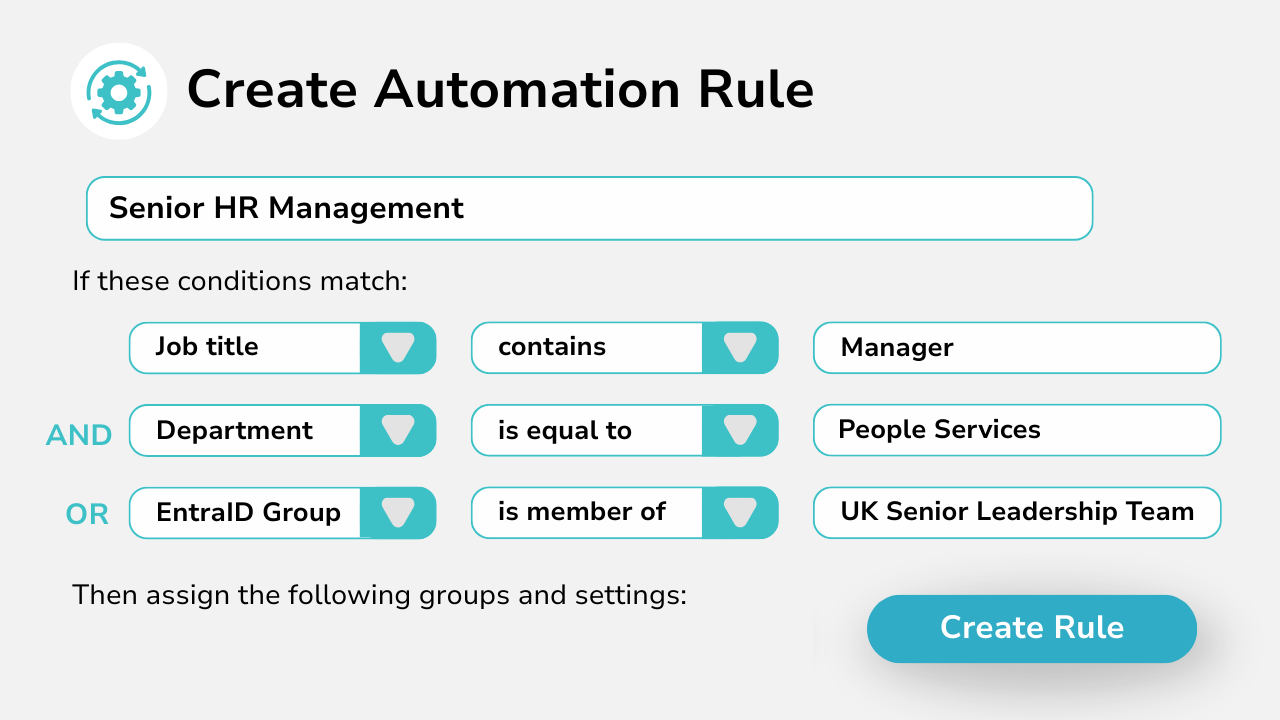
Create Rules Based On Entra ID Attributes

Create rules based on conditions matching your users’ Entra ID user object data. Automate them to run every hour so you can set and forget.

  • Use user attributes or group memberships, or both!
  • Create multi-targeted rules for least admin effort
  • Configure the Teams experience each user needs
Diagram showing automation rule creation witn AND and OR logic.
Video cover image, Automate provisioning processes.

Cascade Automation Rules

Configure the order rules should execute to enable you to cascade configuration.

  • Deploy baseline experiences by default

  • Granular targeting based on custom parameters
  • Full audit trail of changes made

Seamlessly Integrate with ITSM Tools Like ServiceNow

Orto integrates with ServiceNow, Zendesk, WorkDay, Jira, and other ITSM platforms via its secure API. This lets you automate Microsoft Teams provisioning directly from tickets and workflows.

Using the Orto API, you can trigger automated license, number, and policy assignment based on Entra ID user information. No scripts or manual steps required.

Every action is tracked, auditable, and aligned with your change processes, helping you reduce errors, accelerate onboarding, and stay in control.
Seamless integration with servicenow.
Seamless integration with Zendesk.
Seamless integration with workday.
Seamless integration power logos.

4 Benefits Of Automating Teams Provisioning With Orto

0%

Operational Cost Savings

0%

More time efficient vs manual processes

0%

More accurate at getting it right the first time

0%

Less stress in your IT admin team​

Pricing Calculator

Number of Changes Per Month
How many moves, adds, changes do you perform in a month?

500

50

1000

Estimated cost of changes per month:

£18,750.00

Estimated cost of changes per year:

£225,000.00

Savings with auto provisioning per month:

£13,312.50

Total Savings Per Year:

£159,750.00

Pricing Plans

Currency:

GBP
  • GBP
  • EUR
  • USA

Orto Standard

Simplify Microsoft Teams user management — numbers, policies, licences, and call queues.

Orto Pro

For enterprises that want to fully automate Microsoft Teams user provisioning

No. Users:

£0.50 monthly per user

N/A for selected user count

Minimum users

50+

200+

Number inventory management

Policy & persona management

Granular Roles-Based Access Control

Delegate user management by region

Microsoft license administration

Call queue administration

Automated provisioning

Provisioning API

Use Cases

What Our Customers Say

  • “Our partnership with Callroute has always been outstanding. Communication is seamless, and they consistently demonstrate exceptional customer focus. They are not just a partner; they are a true enabler of global telephony uptime. Their support is exceptionally responsive and a pleasure to work with, even on the rare occasions it’s needed.”

    Dave

    Health, Wellness & Fitness, 1,001–5,000 Employees

    Telephony Engineer in UK

  • “Happy user. Has been great. This makes it much easier to manage numbers. Ease of use and quick support when I have had any issues.”

    James

    Technical Specialist - Collaboration in US

    Packaging & Containers, 10,000+ Employees

  • “Finding CallRoute is possibly the best thing that’s happened for our telco platform. They’ve provided us with administrative and reporting capabilities that nobody else would. They’ve remained extremely flexible, allowing for outside the box thinking and customizations delivered faster than anyone would expect. We intend to stick with CallRoute for the long haul. Highly flexible, extremely attentive to requests and needs, support staff absolutely beyond compare.”

    Russ

    Telephony Architect in US

    Mechanical or Industrial Engineering, 10,000+ Employees

Frequently Asked Questions

Yes, you can try Callroute free with a 14-day trial. No credit card and no commitment required. Your trial includes:

  • 1x UK 0330 number
  • 1x single concurrent call limit
  • Connect up to 4 Microsoft Teams tenants
  • Explore all Callroute Teams Calling features
  • Explore all Orto Teams User Management features

To get started, book a guided setup session so we can tailor the trial to your requirements. All you need is an email address, which you’ll verify during setup.

Automated Microsoft Teams provisioning refers to using tools or workflows to automatically create, update, and manage user accounts, licenses, policies, and Teams Phone configurations without manual IT intervention.

With Orto by Callroute, you can automate Microsoft Teams user management at scale with no-code, reducing errors and accelerating onboarding.

If you’re manually setting up users, licenses, and Teams Phone settings, automation can save you time, reduce errors, and streamline onboarding. This is particularly beneficial if you are in a large enterprise with 500+ users, with a high volume of user moves, adds, changes, and deletes that cause significant provisioning tickets, with repeated provisioning tasks. That’s where errors, delays, high costs, and impacts to user experience creep in.

Automation with Orto is suitable for growing teams, busy IT departments, and MSPs managing multiple tenants. You can automate common provisioning tasks, integrate with ITSM tools, and use it to set up granular roles-based access control.

With a tool like Orto, provisioning becomes fast, accurate, and removes manual and error-prone processes.

The savings of automated user provisioning depends on the number of adds, moves, and changes your organisation makes around managing Microsoft Teams users.

If you assume that an average ticket costs $50 to process end-to-end and you have 1000 tickets a year, then it’s simple math! So do your research on your ticket volumes! Explore our automated provisioning cost calculator above.

Read more about cost savings here.

No, Microsoft 365 does not include automated Teams provisioning by default. While you can manually configure users or build flows with Power Automate, these options require significant admin effort or custom scripting. Orto offers no-code end-to-end provisioning automation purpose-built for Teams and Teams Phone.
While Power Automate is a general-purpose workflow tool, Orto is purpose-built to automate Microsoft Teams provisioning for Teams Phone.

Unlike Power Automate, which requires complex flows, custom Graph API scripting, and manual maintenance, Orto delivers no-code automation tailored specifically to user onboarding, number assignment, license management, and policy configuration.

It integrates directly with HR and IT systems, supports multiple teams tenants in one interface, and offers advanced granular RBAC and audit logging out of the box.

For IT admins and service providers looking to scale Teams provisioning without scripting or flow failures, Orto is a faster, more reliable alternative to Power Automate.

Yes. You can build automation rules from scratch that you can tailor to your organization’s needs.

You can create automation rules based on user attributes (e.g. job title, department, region) and define actions like license assignment, Teams group membership, and telephony enablement.

Admin access to Callroute is secured via your corporate 365 SSO login, along with fine-grained RBAC controls to ensure only authorised admin users can set up and run automations.

All automation activities are logged for auditing and compliance.

Callroute supports integrations with Microsoft Entra ID, HR platforms, and other ITSM tools such as ServiceNow using the Callroute API. These integrations can trigger automation workflows accordingly once set up with the Callroute API.
Orto supports bulk provisioning. Whether you’re onboarding a handful of users or thousands, Callroute enables bulk user provisioning in Microsoft Teams with consistent policies and zero manual effort. This is ideal for seasonal hiring, mergers and acquisitions, or IT transitions. You can also bulk provision users via an old-fashioned CSV file if you like. We make it easy.
Yes. Callroute is used by many Managed Service Providers (MSPs), allowing them to automate Microsoft Teams user provisioning across multiple tenants. This includes policies, phone numbers and licenses for common roles, locations or departments, and can be tailored to each customer’s setup.