Manage Every Client’s Teams Environment In One Portal​

Orto simplifies Microsoft Teams user management for MSPs by centralizing policy, number, and user provisioning across all customer tenants.

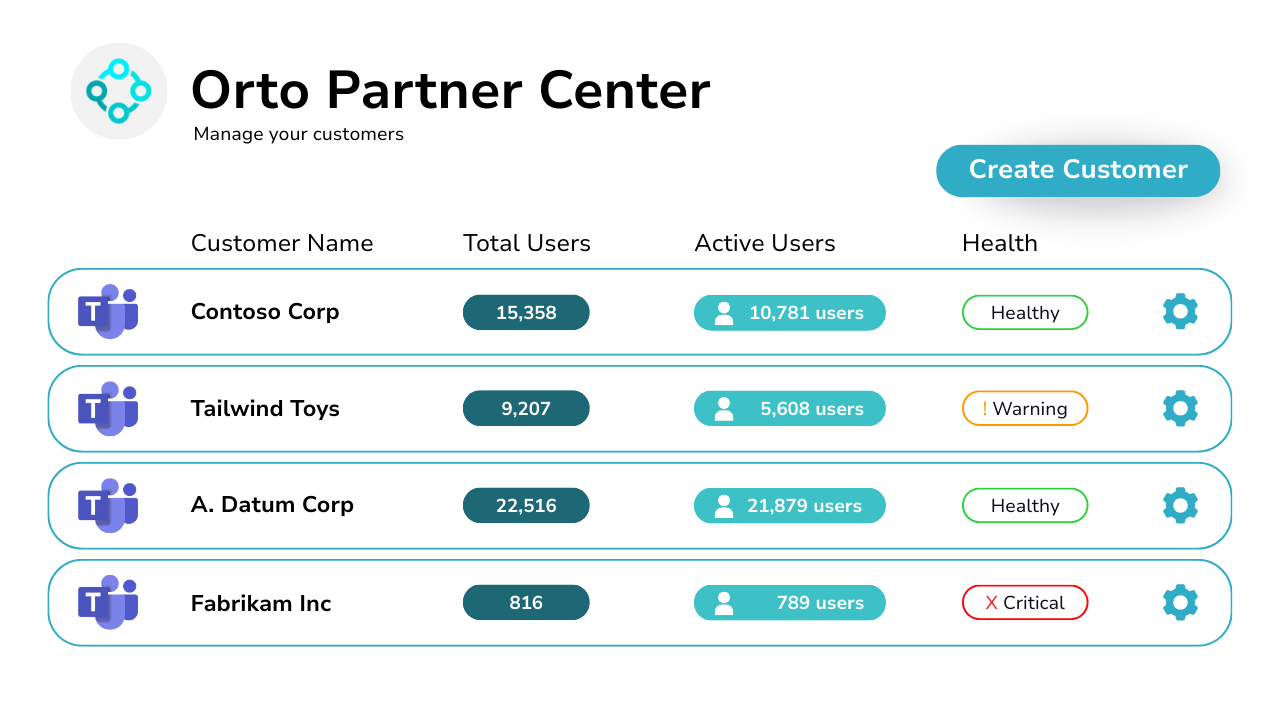
Diagram showing Orto partner center for managing customers.

Smarter Microsoft Teams Management For MSPs

As an MSP, managing Microsoft Teams for multiple clients can be a daily drain. Constant account switching, inconsistent configurations, and error-prone manual processes. Orto by Callroute puts you in control. Connect all your customers’ Microsoft 365 tenants to one secure portal. Assign policies using Personas, manage numbers with precision, and deliver scalable service, all without the usual overhead.

Improve Quality Management & Deliver Consistently

Using Orto’s Microsoft Teams management tool for MSPs, you can complete tasks quickly and accurately, increasing customer satisfaction, retention, and your profit margins.

90%

Faster at completing user changes vs manual processes

98%

More accurate, reducing ticket escalation

77%

Less costly than relying on manual change processes

Features of Our User Management Platform
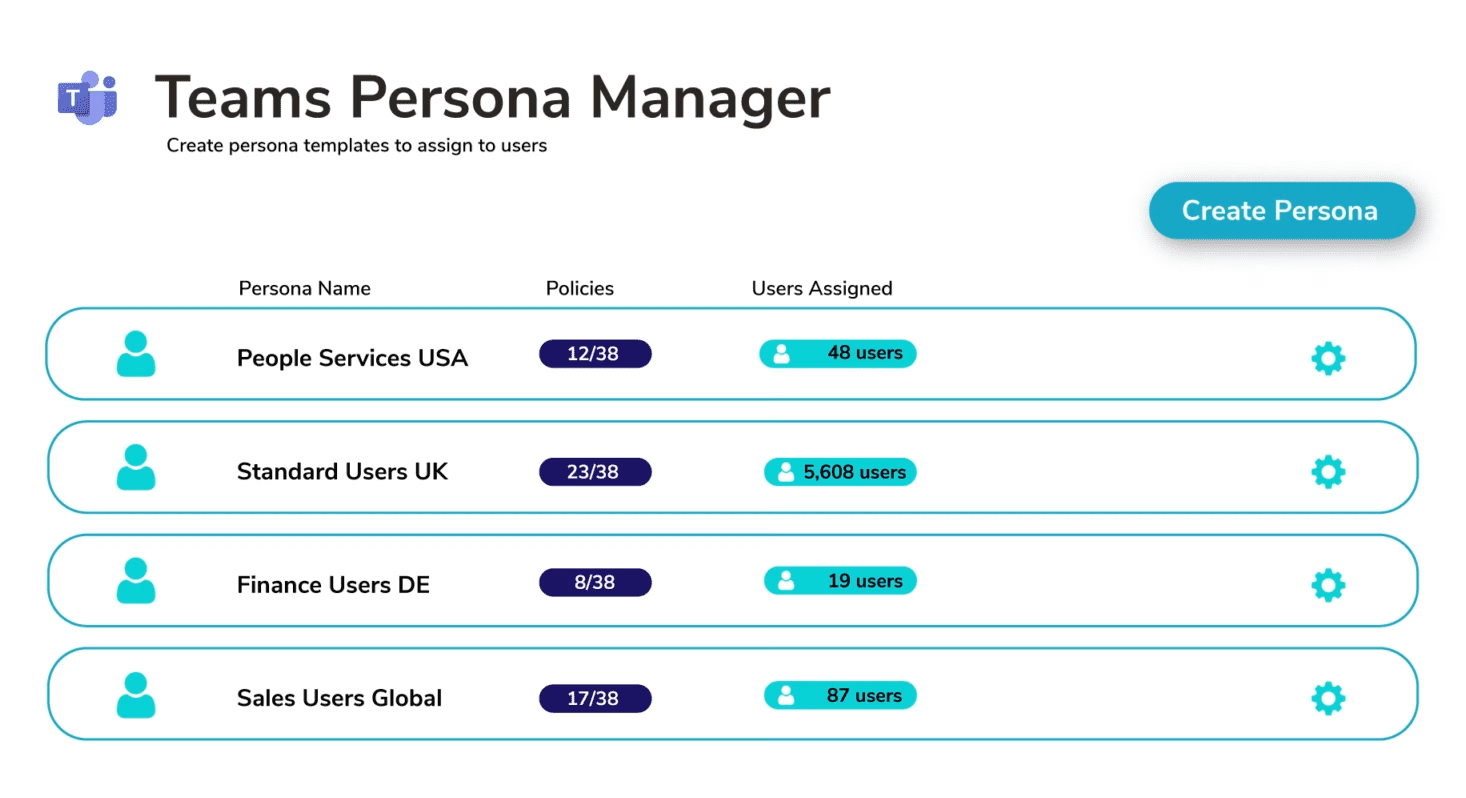
Diagram showing Orto partner center for managing customers.

Manage Customers In One Place

Using the Orto for Teams service provider portal you can access all your customer tenants in one place.

Create support engineer logins that can access approved customer tenants and grant custom permission levels.

Implement Service Standards That Meet Your Customer Needs

Configure provisioning templates and policies to match individual customer needs so they can be applied consistently.

Reduce the number of manual provisioning errors that generate excess support tickets. Improve your customer satisfaction and retention as a result.

Diagram showing Teams persona manager with a create button.
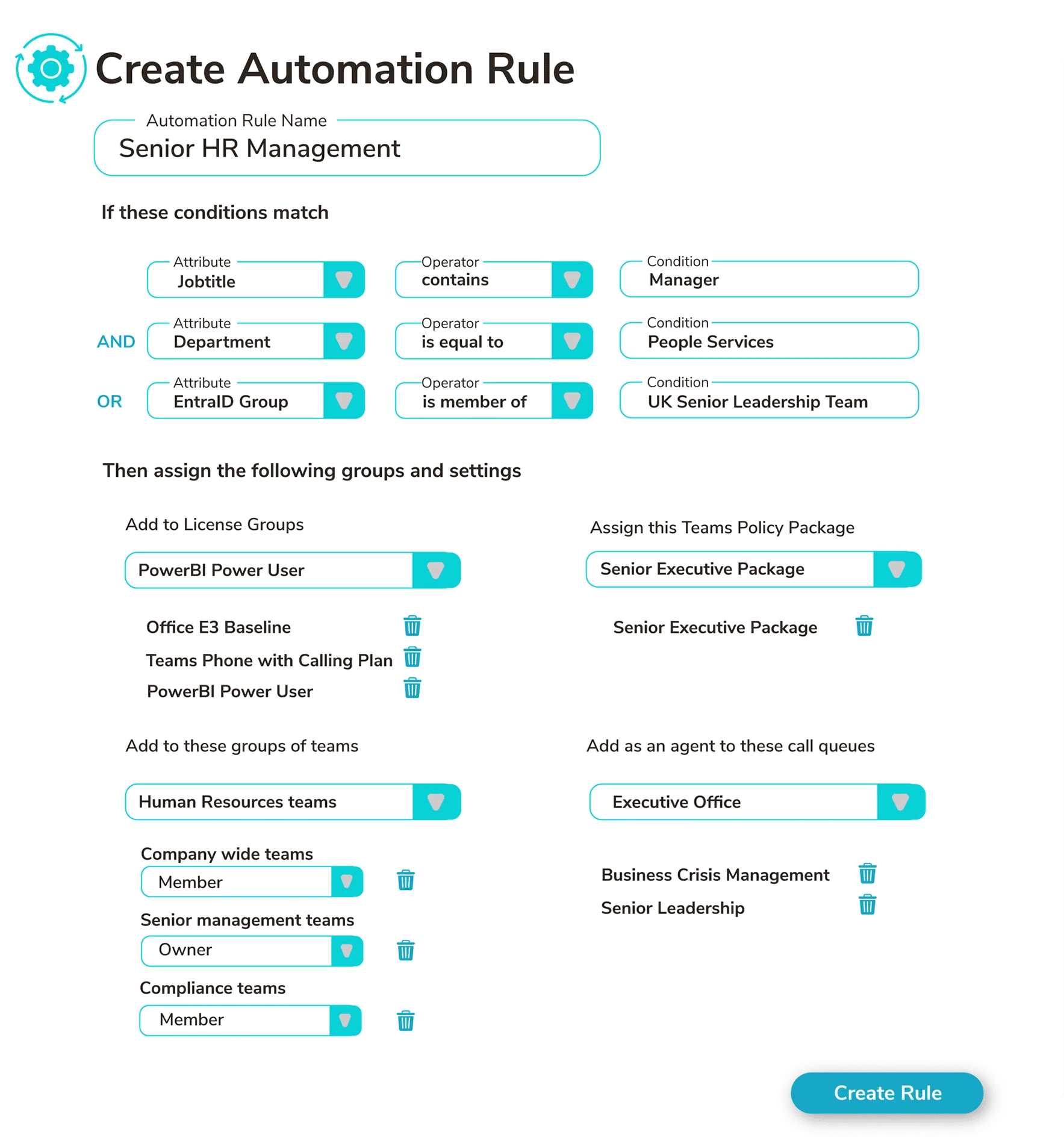
Diagram showing the automation rule creation and assignment process.

Automate 99% Of Customer Provisioning Requests

99% of all customer provisioning requests can be automated without manual intervention.

Once you’ve deployed your customer provisioning templates, Orto will automatically provision users matching those templates, speeding up ticket resolution and delivering consistent Teams experiences to your end customer users.

Train Your Engineers In Less Than An Hour

Orto’s easy to use self-service portal is intuitive and always up-to-date, allowing you to train your new support engineers in under 1-hour.

Enable all your engineers to support all your customers without specialist domain knowledge of each customer, improving your service productivity.

Diagram showing options for number assignment.
Diagram showing user access permissions for Teams.

Speed Up Customer Onboarding

Transition customers from service order to full service operational support faster.

Implement service definitions ready to execute custom procedures, scripts, or access requirements.

Support More Customers Per Engineer Resource

Reducing the complexity of engagement and support means that you can support more customers per engineer increasing your productivity output and profit margin.

Using Orto for Teams is like adding an extra 10 people to your team.

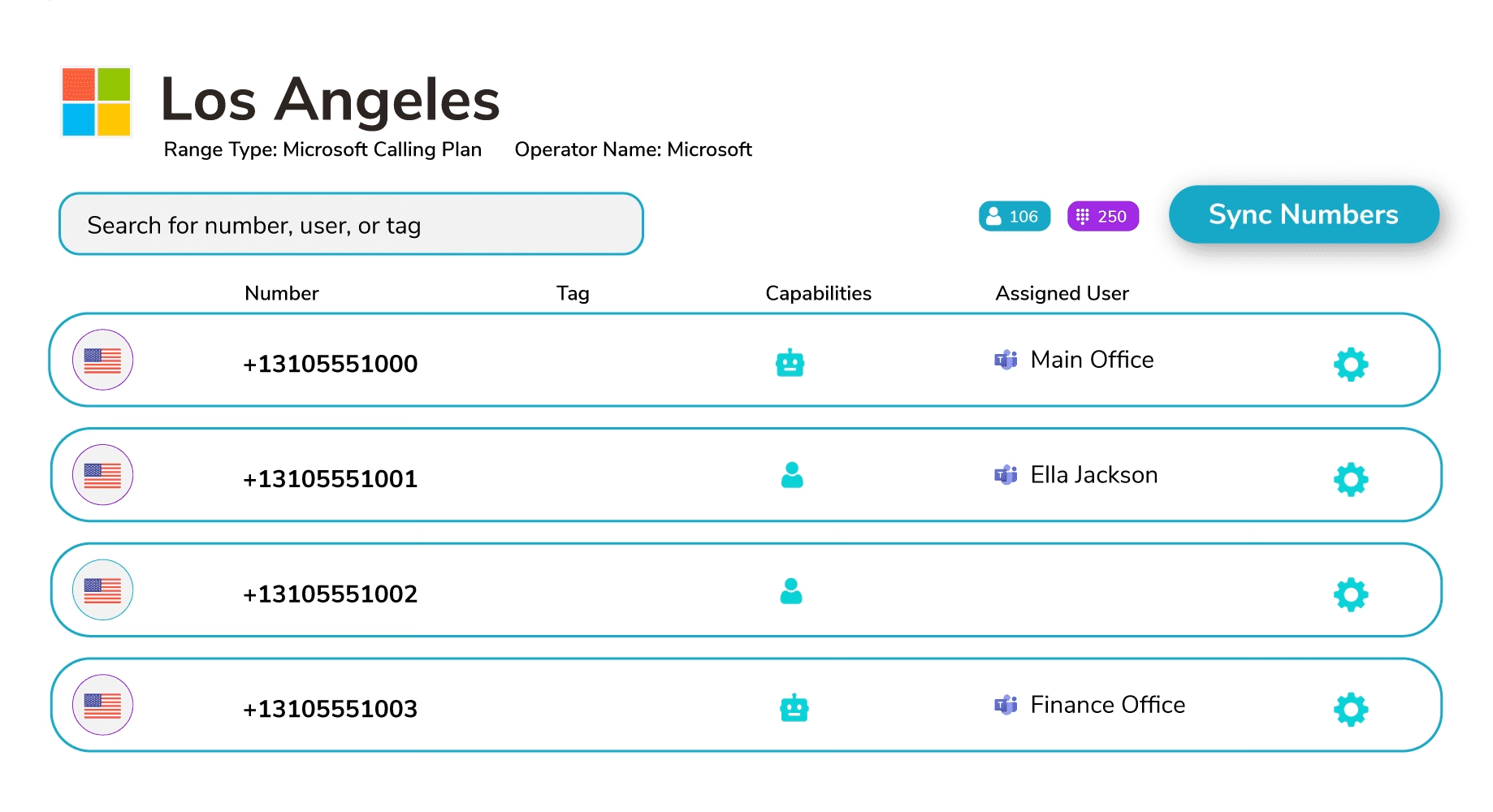
diagram showing Los Angeles number range type management.

Book a demo

Join over 150,000 other users that use Callroute to stay connected, and manage their numbers and user more efficiently.

Improve Customer Service & Satisfaction

As an MSP using Orto, you can reduce the manual burden on your engineers and increase provisioning accuracy.


Join Other MSPs Already Streamlining Their Teams Management With Orto

As an MSP using Orto, you can reduce the manual burden on your engineers and increase provisioning accuracy.
Callroute Makes Teams Phone Management Clear & Easy!

Callroute lets you manage Microsoft Teams Phone configuration by an easy and user-friendly portal. It separates the Teams telephony settings from the TAC so that the telephony administrator can only configure what is necessary for Teams Phone functionality and call routing.

Arnold C

Cloud Product Manager, Actis

Frequently Asked Questions

For MSPs, one of the biggest drains on profit is the manual effort of managing each customer tenant separately. Logging in and out to make changes or onboard users wastes time, adds admin overhead, and slows down service delivery.

Orto removes that burden by giving MSPs a single portal to manage all tenants at once. With automation for license assignments, policy enforcement, and number provisioning, repetitive tasks are eliminated.

This means MSPs can:

  • Serve more customers without increasing headcount.
  • Speed up onboarding and day-to-day changes.
  • Protect profit margins while still growing revenue.

With automation, MSPs can deliver a smoother, faster, and more reliable service to their customers. Orto automates provisioning so onboarding is quicker, errors are minimised, and policies are applied consistently across every user.

This allows MSPs to provide a better Microsoft Teams experience with fewer delays and issues, directly improving customer satisfaction and retention.

Orto makes Microsoft Teams provisioning much faster. Tasks that take hours with PowerShell or multiple admin portals can be done in minutes with automation.

This means MSPs can onboard customers more quickly, deliver projects faster, and free technical staff to focus on higher-value work instead of repetitive admin.

Normally, MSPs need to log in and out of each customer tenant to make changes or onboard users. This is slow and repetitive.

Orto removes that overhead by giving MSPs a single portal to manage all tenants in one place. Automation then handles tasks like license assignment, policy enforcement, and number provisioning across tenants.

The result: less admin effort, faster delivery, and more time for technical staff to focus on higher-value work.

Orto streamlines the day-to-day management of Microsoft Teams across multiple tenants. Instead of repetitive manual tasks, MSPs get a single portal with automation built in.

This reduces errors, speeds up onboarding, and ensures policies are applied consistently. Less time is wasted on admin, so technical teams can focus on higher-value projects and supporting more customers without increasing headcount.

Orto helps MSPs cut down on mistakes that often happen with manual Teams admin. Instead of relying on PowerShell or logging in and out of different tenants, MSPs use one simple portal with automation built in.

With Orto, you can also create personas (policy templates). These make sure every user is provisioned in the same way, so policies stay consistent and don’t drift over time.

Many MSPs avoid delegating because traditional tools mean sharing global tenant credentials – a big security and compliance risk.

Orto fixes this with Granular Roles-Based Access Control (GRBAC). This lets you give junior staff or first-line engineers the ability to handle everyday tasks like provisioning, while senior staff keep full oversight.

The result: MSPs can delegate safely, speed up service delivery, and still stay in control of security and compliance.

Orto helps MSPs cut project and onboarding times by removing manual admin and replacing it with automation.

Key time-saving features include:

  • Personas (policy templates): Standardise user profiles so licenses, numbers, and policies are applied consistently every time.
  • Automation: Handles repetitive provisioning tasks in minutes instead of hours.
  • Day 1 onboarding: Use CSV templates to bulk provision users, ideal for large-scale Teams migrations.

Together, these features let MSPs onboard customers faster, deliver projects more efficiently, and reduce errors, all while freeing technical staff to focus on higher-value work.

Yes, MSPs can choose how they use and package Orto:

  • Internal tool: Use Orto behind the scenes to speed up provisioning and management, and charge customers for the managed service you deliver.
  • Resell as self-service: Offer Orto directly to your customers as a branded self-service portal, so they can handle day-to-day tasks themselves while you maintain control in the background. Find out more.

This flexibility means you can build new revenue streams, reduce admin effort, and give customers the level of control that suits them best.

Book a demo

Join over 150,000 other users that use Callroute to stay connected, and manage their numbers and user more efficiently.